
The design of shallow geothermal borefields is always a little bit trial and error, but what if it is not? Today we release a new automated method that allows you to calculate the required borefield depth and size simultaneously, available to everyone.
Borefield design (in the past)
By now, you probably already know that GHEtool Cloud does not come with a predefined list of configurations. You are free to create your own based on either a standard configuration such as a U-shape or a rectangle, as well as import one from an AutoCAD file as explained here. This makes GHEtool Cloud the most flexible design tool on the market, with maximum borefield sizes up to 5000 boreholes.
This choice for design flexibility has of course determined the way you design borefields with GHEtool. You start with a certain design consisting of a configuration and depth, you simulate the temperature profile, and you adapt your design accordingly. Although this process provides considerable insight into borefield physics, as described for example in this article, it is somewhat time consuming.
Another way to approach the design is to start with a certain borefield configuration and let GHEtool calculate the required borehole depth to keep the temperatures within the limits. This already removes part of the guesswork, but the difficulty is that you can encounter gradient errors when working with higher cooling peaks. You can find our article on the gradient error here.
These two elements together can sometimes make borefield design unnecessarily hard, especially if you want to do it quickly and accurately. Therefore, we have developed a brand new method for you.
The long-awaited method
Since our release in November 2024, the most requested feature has been a method that can automatically size both the required depth and size, that is, a method where you can specify your available drilling area and have the borefield sized fully automatically. Until now, this method was infeasible due to extremely long simulation times. Since GHEtool Cloud did not have a predefined set of configurations, it would take hours to try out all potential combinations. Over the last year, we have worked hard on two major improvements in the back end to make this method possible: the implementation of artificial neural networks and Bayesian optimisation.
Artificial Neural Networks
The calculation of the required borehole depth takes time. Especially when you are working with variable fluid properties for the most accurate results, as explained here, the simulation can easily take tens of seconds. That is acceptable for a single simulation, but when you perform a parameter search and want to determine not only the required depth but also the optimal configuration, it becomes infeasible.
Last week we therefore introduced Artificial Neural Networks into GHEtool, as described in this article. This AI enhancement caused a significant drop in simulation time for calculating the required depth while maintaining reasonable accuracy. Together with several other smart refinements of the methodology, we are able to speed up this process by a factor of two to five. That is already a promising start, but since we are evaluating thousands of options, it is just the end of the beginning.

Bayesian optimisation
In this method to find both the optimal borefield size and depth, there are a number of parameters that need to be tuned. These include the shape of the configuration such as U-shaped, L-shaped, box-shaped, rectangular shaped or dense shaped, the number of boreholes in the length and width direction and the spacing in the length and width direction.
In the optimisation world, each of these parameters that requires tuning is called a hyperparameter, and there are different strategies for solving this type of problem, as shown below.

A first possible solution is to perform a grid search. In this approach, you define the ranges you want to explore, for example the number of boreholes in the length direction [1, 2, 3, 4, 5], and you combine all possible values. Next, you calculate the required borehole depth for each combination, and the best result becomes your final answer. This approach is of course very time consuming.
Another, less structured approach is to use a random grid. Here, the spacings are not equal and the input parameters are selected randomly. After a number of searches and trials, the best solution found is presented. This method is also rather time consuming and offers low certainty that a good solution will be identified.
The last option, which is the method implemented in GHEtool Cloud, is to use Bayesian optimisation. The idea is that we start with some random combinations of input parameters for the borefield design and calculate the required borehole depth for each configuration. Based on these initial simulations, the algorithm constructs an uncertainty function that indicates where it is most likely to find the best solution, and it then iterates statistically towards it. This process is also illustrated in the figure below.
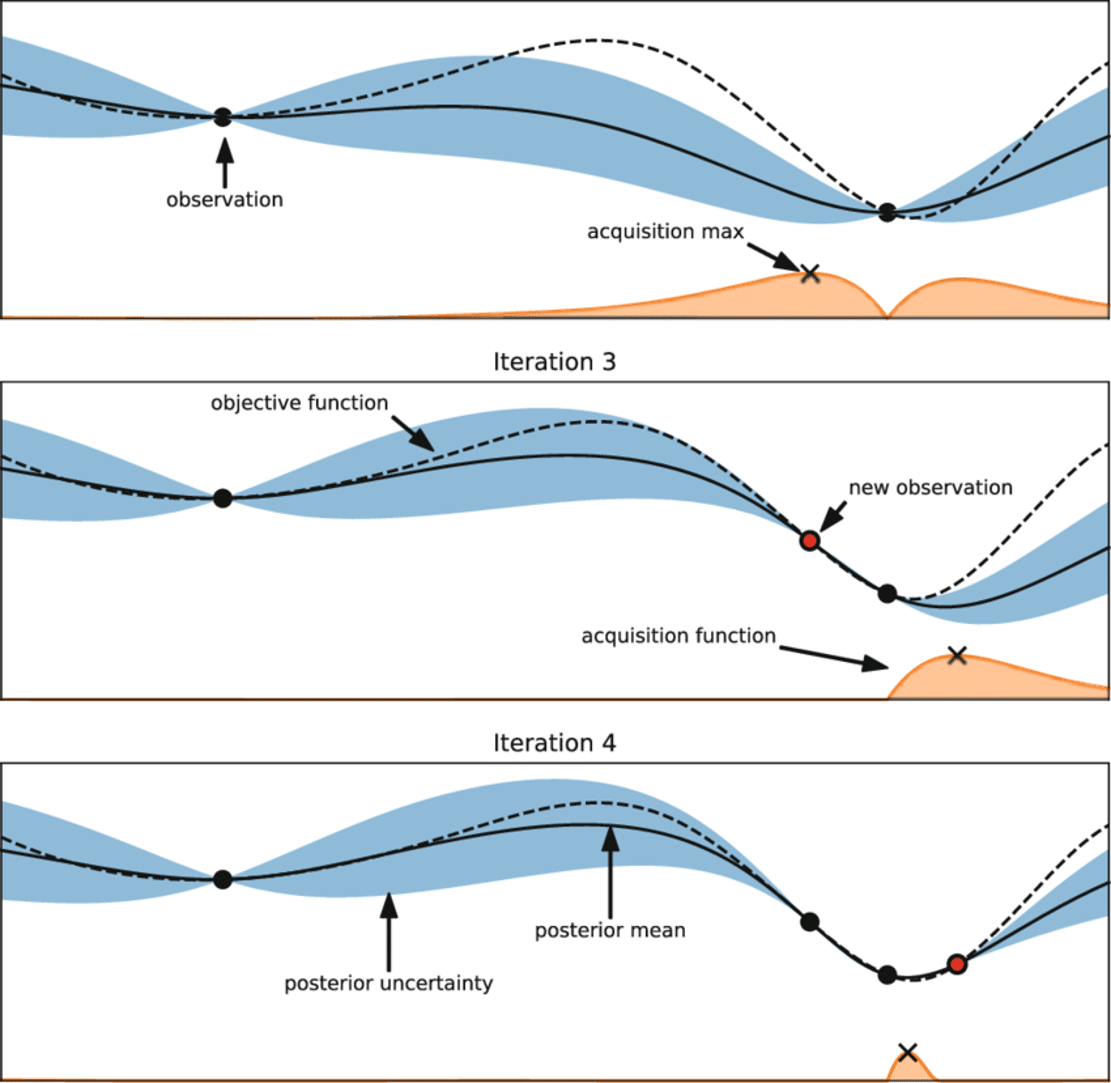
The picture above shows different iterations of the optimisation algorithm. In the top image, two calculations have already been performed, so at these two points we know exactly what the value is, in our case the total borehole length. The further you move away from these simulations, the greater the uncertainty becomes.
In the next iteration, number 3, we want to try another borefield configuration with the highest chance of giving us an even lower total borehole length. Therefore, we search for the lowest point within our uncertainty bounds shown in blue and calculate a new point. By repeating this process, the uncertainty bounds become smaller and we converge towards an optimum.
!Note
Since the first step in this algorithm is to test a number of random borefield configurations in order to initialise the uncertainty bounds, we may end up with different solutions when running this optimisation multiple times. This is inherent to the optimisation of non convex problems. With the Bayesian method however, we always have a high level of certainty that we are at least close to an optimal solution.
Calculate required size and depth in GHEtool Cloud
Starting today, this method is implemented as a new aim available to all our users called calculate required size and depth. In this method, the borefield tab is changed from a configuration selector to a place where you can enter the optimisation bounds, as shown below.
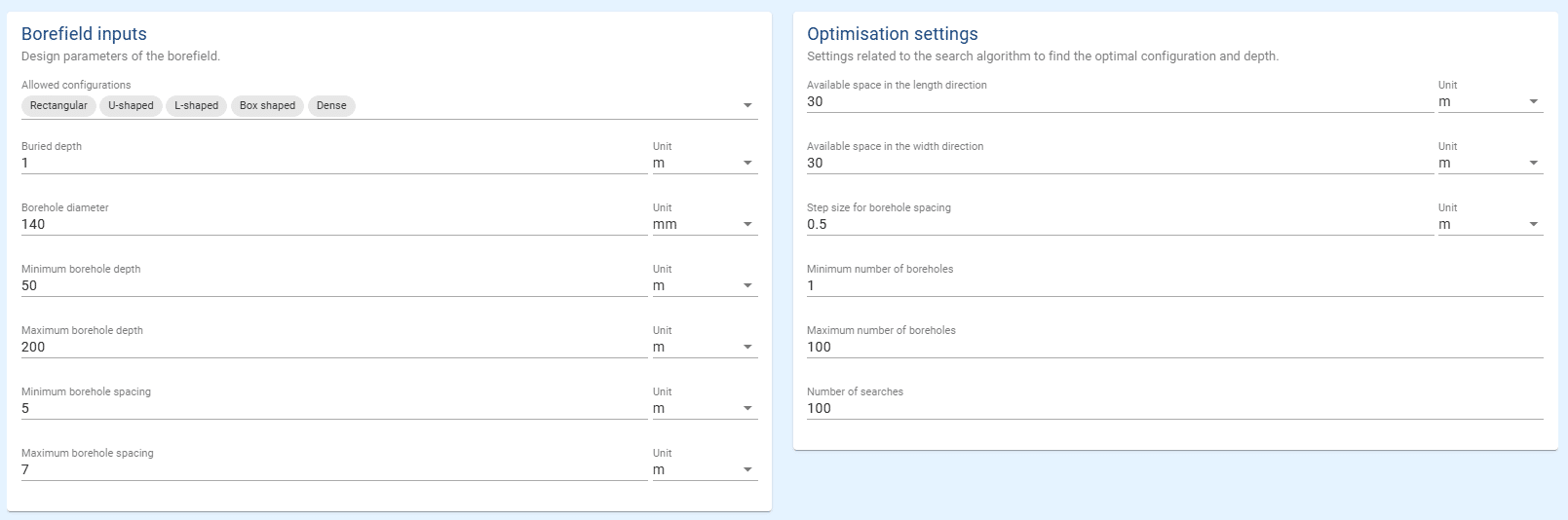
On the left of this borefield tab, you can enter the design limitations of the simulation, that is, which configurations are allowed, the minimum and maximum depth and so on. On the right side, you will find parameters related to the optimisation framework. Besides your available space and the step size for the borehole spacing, there are three additional parameters: the minimum and maximum number of boreholes and the number of searches.
A good estimate of the first two values can help speed up the calculation time, since the algorithm will ignore any number of boreholes outside this range. If you want full design freedom, you can simply leave the range sufficiently large.
The last parameter is the number of searches itself. As explained above, the more searches you perform, the more accurate your optimal solution will be. For smaller borefields, fifty is usually enough to obtain a good result, whereas for larger borefields with a wide available footprint and many potential configurations, using one hundred or more searches can be a good idea.
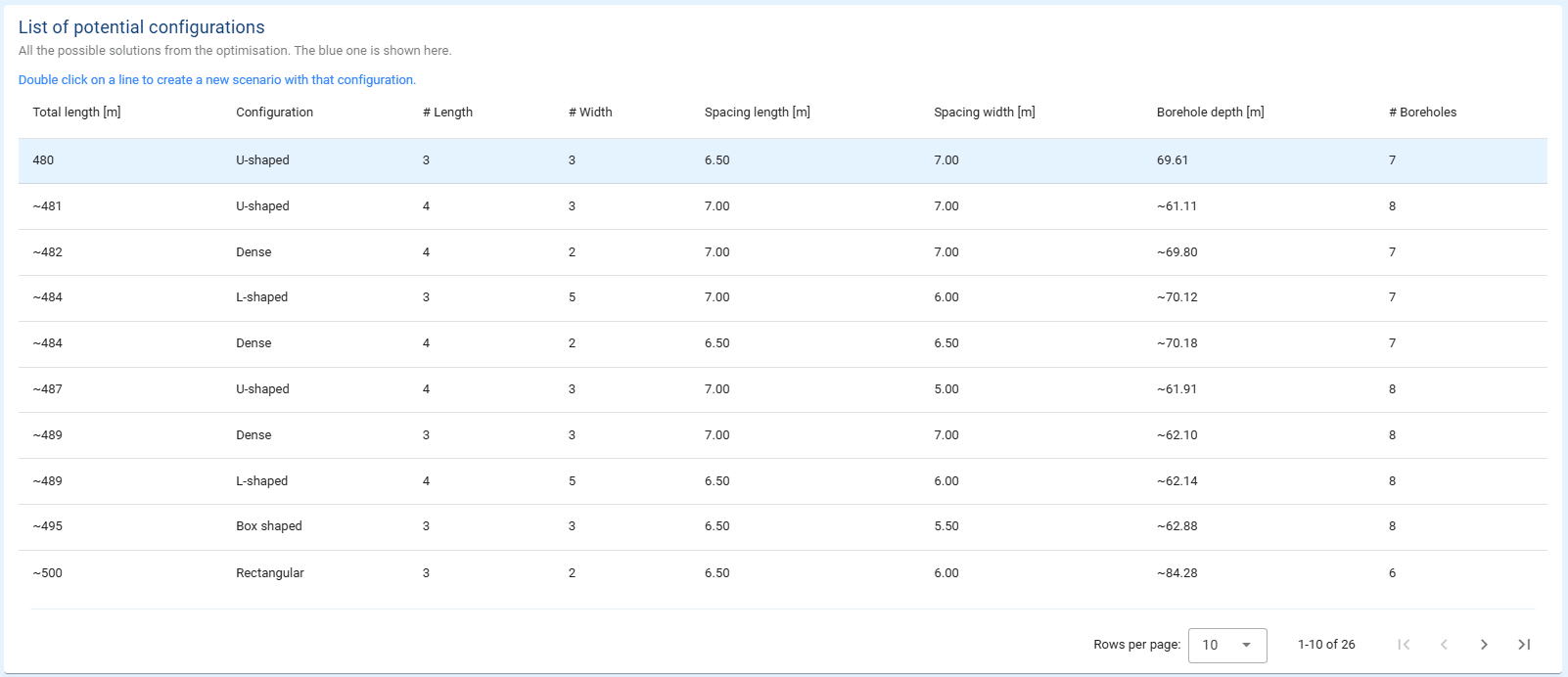
The result of this aim is a table with all the potential good candidates that the optimisation strategy has identified, sorted from the solution with the smallest total borehole length to the one with the largest. The best solution is already simulated and shown in the scenario.
!Hint
If you want to simulate another potential configuration, you can simply double click on the line and a new scenario will be created with that configuration.
One important note is that the depths and total lengths include a tilde symbol to indicate that there is some uncertainty in these results. This is because the ANN was used in the backend, which can lead to slightly different outcomes. Although the proposed solutions are expected to be the best options, the depths may be slightly off. To address this, the general tab includes a new aim specific option called ‘Accurately calculate optimal configuration’. When this option is set to true, the most promising configuration after the optimisation is resimulated without the ANN to determine the exact required borehole depth.
Conclusion
This article introduced a brand new and powerful method in GHEtool Cloud: the automated calculation of the required borefield size and depth. With the implementation of an Artificial Neural Network and the power of Bayesian optimisation, you can now enter your ground information, available footprint and building load and let the algorithm do the rest.
References
- Watch our video explanation over on our YouTube page by clicking here.