
In this article we give a quick overview of all the functionalities of GHEtool Cloud as they are available in the summer of 2026. The goal is to show what the possibilities are, how you can get started and where you can find more information related to specific methods.
What is GHEtool Cloud?
GHEtool Cloud is a cloud based borefield sizing tool which is both fast and easy to use for small projects and extremely versatile and advanced for more demanding projects. If you are working in the geothermal domain and need to design shallow geothermal borefields, GHEtool is exactly the tool you need. In the following subsections we go over some of the key features of GHEtool and refer you to the relevant articles on these topics.
!Note
This article is a brief summary of all the features of the software. If you want to know more, please read the topic specific articles or watch the video tutorial.
Creating an account
If you go to https://cloud.ghetool.eu/register you can register an account for free. Once you have confirmed your email address you can start a 14 day free trial period of the tool without any limitations so you can try out all the powerful features for yourself.
!Note
If you register for a demo call with the founder you get an extra 14 days in your trial period for a total of 4 weeks. This way you can really try out the tool to the fullest and experience the benefits it can bring to your design activities.
What type of inputs can GHEtool handle?
The first step in making an accurate geothermal simulation is to provide the data as accurately and in as much detail as possible. Besides being able to define some general simulation settings as well as the pipe and fluid parameters, GHEtool has some extra options to really improve your design work.
Ground layers
Traditionally, the ground in geothermal simulations is modelled as one homogeneous layer with a single conductivity and volumetric heat capacity. However, when you are in a very heterogeneous ground (for example with a sand layer on top of solid rock), this can lead to wrong results when you calculate the required borehole depth. Therefore, in GHEtool it is possible to enter the ground layer by layer.
More information on ground layers can be found here.
Custom borefields
GHEtool does not work with a limited number of preconfigured borefields, but allows you to design with the borefield you have. If you have a project where part of the borefield is under the building and part is just under the ground surface, or you have a borefield with tilted boreholes, every borefield you can imagine can be modelled with GHEtool. You can even import borefields from a CAD file.
More information on tilted boreholes can be found here. An article on working with custom borefields can be found here.

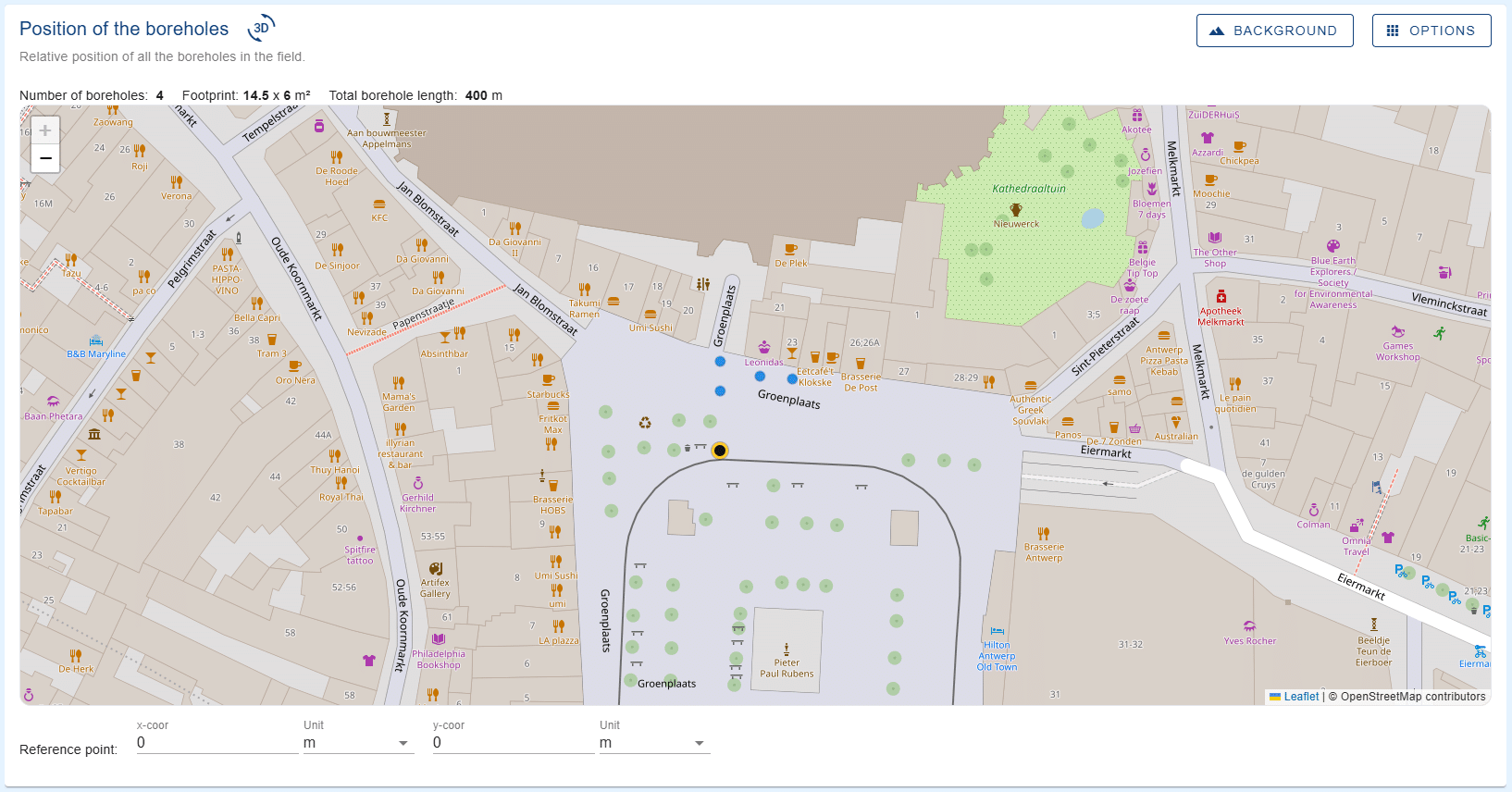
As of this year, it is also possible to plot the coordinates directly on a map. An example is shown below, and more information can be found here.
Variable flow rate
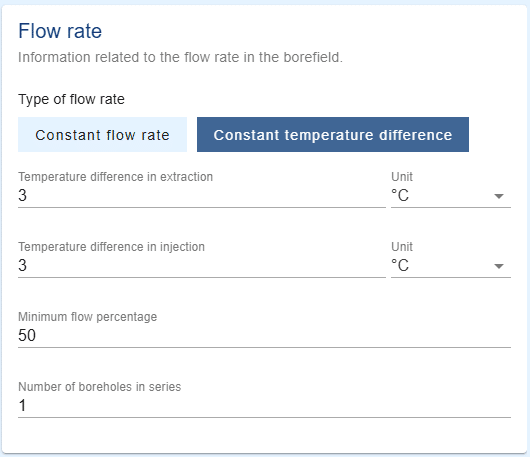
Traditionally, borefields are simulated using constant flow rates. However, in the age of modulating heat pumps, this is no longer entirely accurate. Therefore, GHEtool allows you to work with either a constant flow rate or a constant temperature difference across the heat pump. For more information about this feature and the resulting improvement in accuracy, click here.
Hourly and multi yearly loads
For feasibility studies, geothermal simulations are often done with a monthly load resolution. However, for more accurate results, it is possible to load an hourly profile directly from a dynamic simulation software into GHEtool. For phased projects, where the building demand changes over the years, you also have the option to import a multi year load.
For more information about working with hourly loads, the reader is referred to this article.
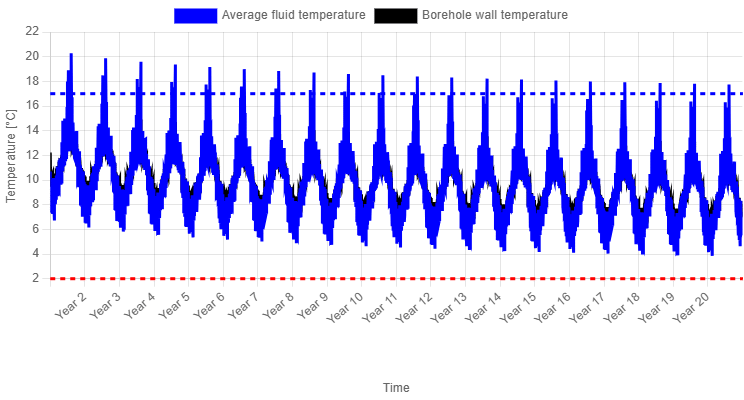
When no hourly load profile is available, you can generate one in GHEtool using your own estimates for the annual heating and cooling loads, as well as the maximum heating and cooling peak loads. More information can be found here.

Heat pump efficiency
Traditionally, all geothermal simulations assume a constant heat pump efficiency when converting the building load into the ground load. However, in reality, this efficiency depends on the fluid temperatures at both the evaporator and condenser, as well as the part load behaviour of the heat pump in the case of a modulating unit.
We have partnered with several heat pump manufacturers to develop digital twins of their heat pumps, allowing you to select the exact model you want to use. As a result, GHEtool Cloud can calculate the SCOP for you, rather than requiring you to estimate it yourself.
More information can be found here.
!Note
New heat pumps are continually being added to the list, and later this year, you will also be able to define your own modulating heat pump.

Methods in GHEtool
Below you can find a short overview of all the different methods and simulation aims in GHEtool Cloud.
Simulate temperature profile
The traditional way to simulate borefields is by entering the borefield design, ground parameters, borehole internals and your load profile, and simulating how the temperature evolves over the simulation period. Although every geothermal simulation tool has this basic functionality and the graphs look the same in the end, what is going on in the background defines your accuracy.
With GHEtool we have made some major changes related to accuracy by incorporating varying fluid properties, which you can read about here.
Calculate required depth
When you have no depth restrictions, GHEtool can calculate the required borehole depth to put 100 percent of the load onto the borefield, taking into account both the maximum and minimum average fluid temperature limits. Especially when combined with the pressure drop calculation, this can be very valuable in regions where deep boreholes are common.
More information on this method can be found here.
!Caution
Whenever you have a significant cooling demand, this method can sometimes cause a gradient error. This means there is no solution where both the minimum and maximum average fluid temperature thresholds are kept. More on this error and why it occurs can be found here.
Calculate required size and depth
In addition to calculating the required borehole depth, GHEtool can automatically determine the required number of boreholes, their configuration, and the borehole depth needed to achieve a viable borefield design with either the minimum total borehole length or the minimum number of boreholes.
This method is particularly useful when a depth restriction is in place, as the algorithm will add additional boreholes instead of simply increasing the borehole depth. As a result, the gradient error does not occur.
More information on this method can be found here.

Contour plot simulation
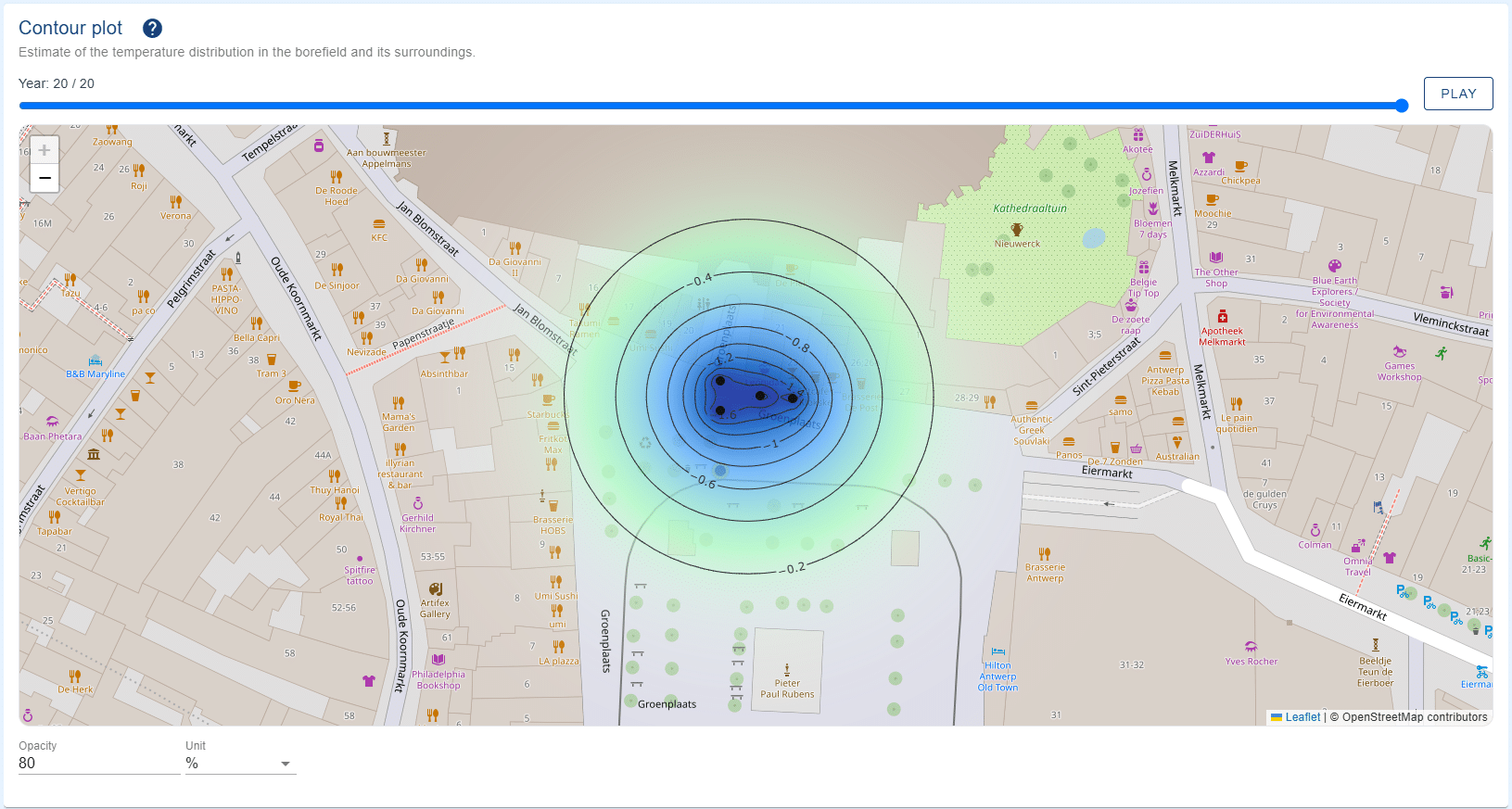
In addition to the traditional temperature profiles, which show the variation in fluid temperature within the borefield over time, GHEtool can also generate a two dimensional representation of the thermal influence in the ground. An example of one of these contour plots is shown below, and more information can be found here.
Simulate active and passive cooling
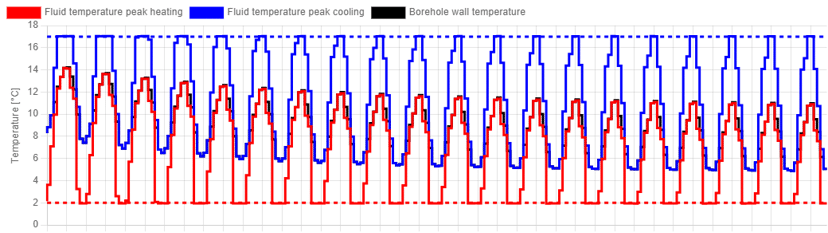
With cooling becoming increasingly important, GHEtool offers a methodology to combine both passive (also called free) cooling with active cooling. This combination can be done either by using a temperature threshold (where passive cooling is the default option and active cooling is used when the fluid temperature crosses a certain threshold) or by using default active cooling in certain months.
For more information about the combination of active and passive cooling, the reader is referred to this article.

Simulate hybrid systems
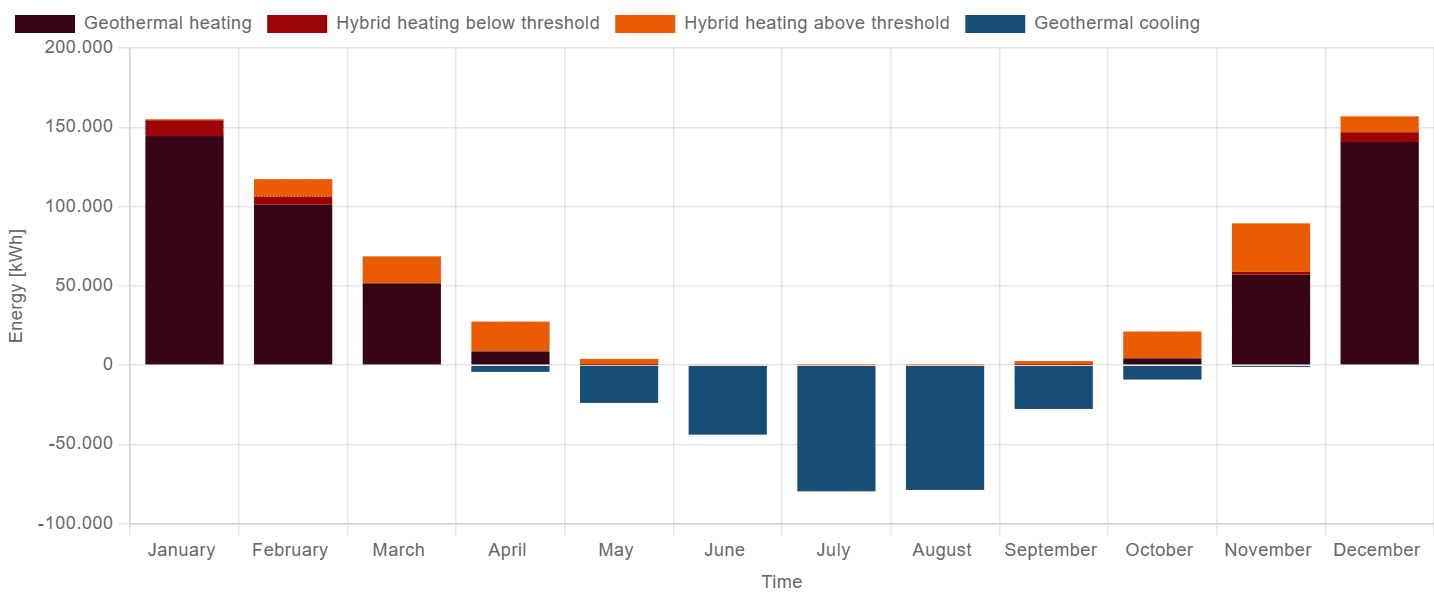
In more and more cases, geothermal systems are combined with other technologies such as an air source heat pump or gas boilers (for example in a renovation context). These systems are called hybrid since multiple technologies work together to heat and cool your building. Within GHEtool you have the option to simulate such hybrid systems without having to specify exactly which technologies you are combining. The only parameters you need to fill in are 1) what power is available and 2) above (or below) which outside temperature this hybrid system is the preferred way of heating or cooling.
More information about the simulation of hybrid systems can be found here.
Optimise hybrid systems
Besides simulating hybrid systems, GHEtool can also optimise hybrid systems for you. This is particularly useful when you have a project with a limited budget or space to install a borefield and you want to know what share the geothermal system can have in the entire heating and cooling demand. With GHEtool you can calculate this for three different objectives: maximum geothermal power, maximum geothermal energy and balance.
More information about these methods can be found here (for the optimisation for power and energy) and here (for the optimise for balance method).
Pressure drop calculation
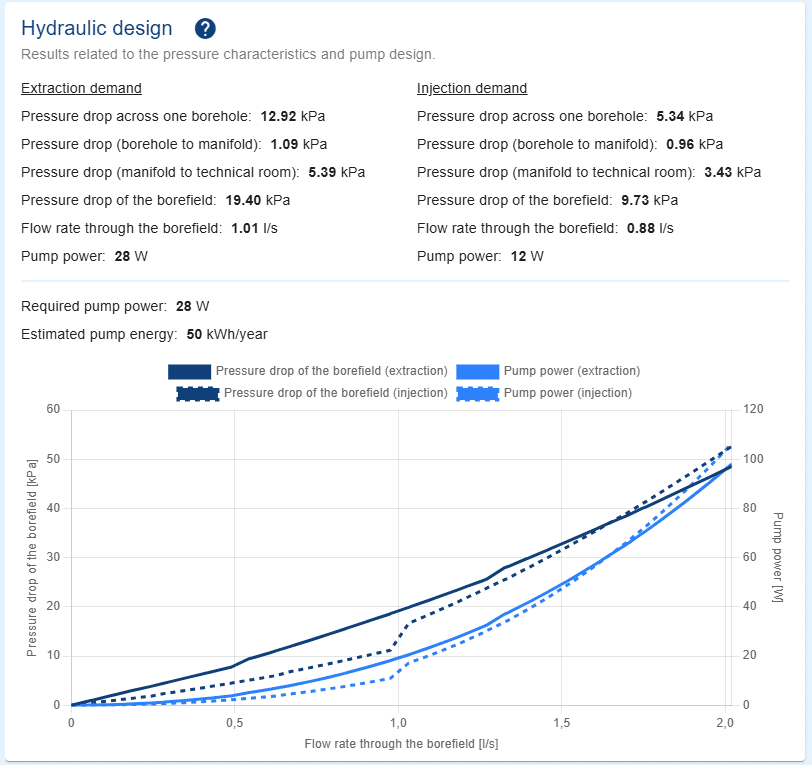
Traditionally, geothermal design software only calculated the thermal performance, namely the evolution of the ground and fluid temperatures over time. However, as systems become more complex, hydraulic performance is also becoming increasingly important. That is why GHEtool allows you to add a pressure drop calculation to every simulation, enabling you to verify whether the circulation pump can deliver the required pressure head.
This pressure drop calculation considers not only the vertical section of the boreholes, but also the horizontal pipework and the main header. Furthermore, GHEtool estimates the electricity consumption of the circulation pump, an aspect that is still too often overlooked.
More information on the pressure drop calculation in GHEtool can be found in the article here.
TRT analysis
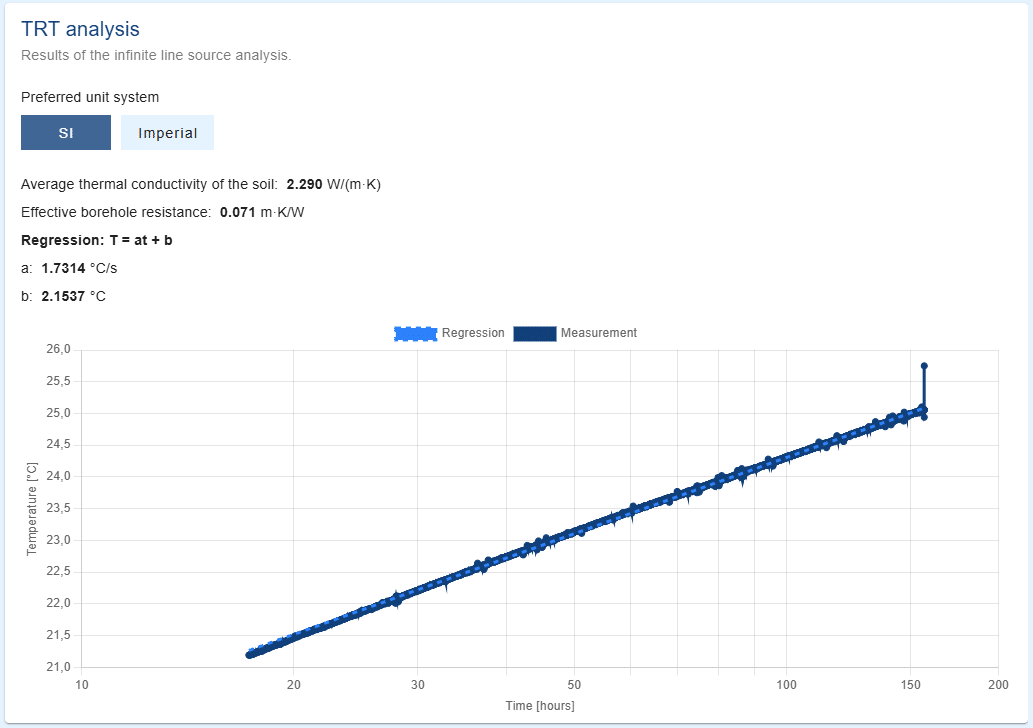
Thermal response tests, or TRTs, are commonly used in borefield design, as they provide a means of determining the thermal properties of the ground, as well as the effective borehole thermal resistance. GHEtool Cloud can analyse the measurement data from these tests. More information can be found here.
Interference calculation
The final feature in GHEtool is the ability to calculate the thermal interference between different, hydraulically separated borefields. Borefields are often designed under the implicit assumption that there are no nearby systems influencing the ground temperature at the project location. However, as geothermal energy becomes increasingly widespread, this assumption is no longer entirely valid.
GHEtool therefore allows you to calculate the thermal interaction between different borefields and assess how neighbouring systems influence the long term temperature drift of your own project, enabling you to account for these effects during the design process. More information about the interference calculation can be found here.

Automated reporting
One last key advantage of using GHEtool Cloud is the automated reporting capability. Whenever you are done with your simulation, you have the option to create either a summarised report (where every simulation is summarised onto one page) or a full report with all the input and background information, graphs and results.
More information about the reporting module can be found here.
Conclusion
GHEtool Cloud is a versatile and powerful tool for everyone designing geothermal borefields. With detailed input parameters and advanced methods, you are able to design the most accurate borefields for both small projects and large systems.
GHEtool is here to help you design with confidence!
References
- Watch our video explanation over on our YouTube page by clicking here.